
You already use Google Search Console to keep track of clicks, impressions and rankings.. Measuring visibility, in Google’s AI‑powered search experiences needs extra analysis. In this guide you will learn how to find the Google Search Console AI Overviews report read its metrics and use that data to make SEO decisions. I hope this helps you.
Key Takeaways
- Google’s Generative AI performance report tracks impressions from AI Overviews and AI Mode in Google Search.
- The dedicated report helps identify pages appearing in AI-generated search experiences.
- You can view data by page, country, device type, and date range.
- The dedicated report does not provide its own clicks, CTR, average position, or search queries.
- Standard Search Console reporting provides complementary organic performance metrics.
- Rising AI impressions indicate greater reported exposure, not guaranteed traffic or conversions.
- Monthly monitoring helps identify visibility trends and content improvement opportunities.
What Is the Google Search Console AI Overviews Report?
The Google Search Console AI Overviews report is a dedicated Generative AI performance report that measures how often website URLs appear in supported AI-powered Google Search experiences. Google announced these reports in June 2026 and completed the worldwide rollout on August 31, 2026.The report covers AI Overviews and AI Mode in Google Search. Google offers a separate report covering generative AI features within Discover.
Why Does the AI Overviews Report Matter for SEO?
The report assists SEO professionals in seeing where their content becomes visible in AI search, which pages appear often and how exposure changes over time. For example a useful informational article might receive AI impressions even when article standard organic clicks stay the same. Yet impressions alone do not show that visitors increased leads improved or revenue grew. Combine AI visibility, with SEO measures and business performance measures.
How Do You Find the AI Overviews Report in Google Search Console?
Follow these steps to access the report:
- Sign in to Google Search Console.
- Select the correct website property.
- Open Performance and locate the Generative AI performance report for Search.
- Choose your preferred date range.
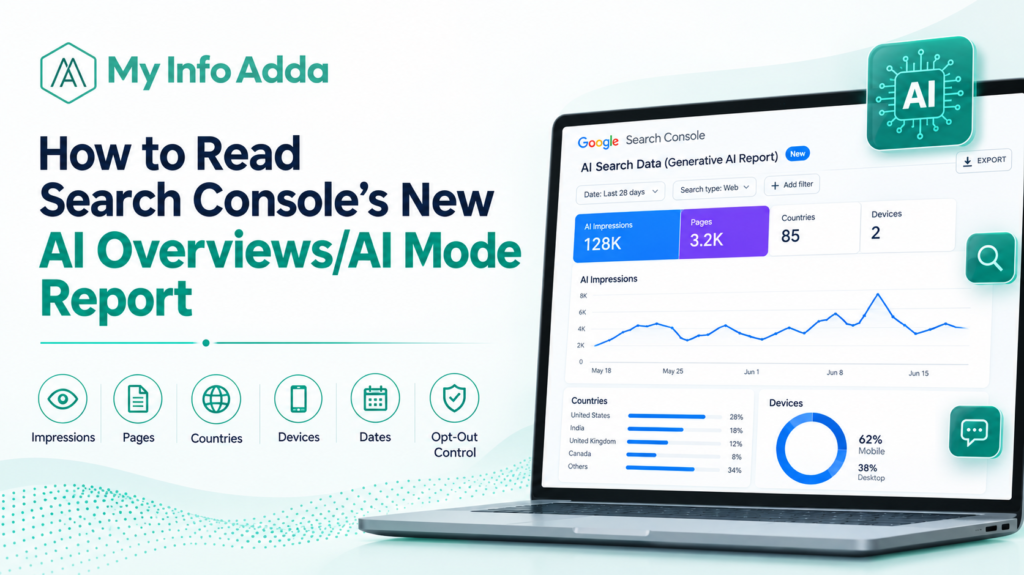
- Review the impressions chart and available Pages, Countries, Devices, and Dates dimensions.
If the report is missing, check whether your website has generated enough impressions from supported AI features. Eligibility and reporting thresholds can affect availability. Official Google documentation.
What Metrics Does the Generative AI Performance Report Show?
The dedicated report primarily measures impressions, showing how often URLs from your website appeared in supported generative AI features.
| Metric or dimension | What it tells you |
| Impressions | Reported exposure in generative AI features |
| Pages | URLs receiving AI-feature impressions |
| Countries | Geographic distribution of visibility |
| Devices | Device breakdown for Search reporting |
| Dates | Visibility trends over time |
The dedicated report does not provide its own click counts, click-through rate (CTR), average position, or search-query data. Use the standard Search Console Performance report for available organic clicks, CTR, positions, and queries.
Can You Track AI Overview Clicks and Search Queries?
The dedicated generative AI report does not provide these metrics separately. However, overall search performance reporting includes activity from supported AI search features, so it can provide complementary performance information.
Importantly, do not add the two reports together as independent traffic totals because their reporting overlaps.
How Do You Analyze AI Overview Impressions by Page?
Page-level analysis helps you identify URLs gaining or losing AI search exposure. Compare equivalent date ranges and investigate meaningful changes before deciding what to optimize.
For example, consider this hypothetical report:
| Page | Previous month | Current month |
| SEO checklist | 400 | 650 |
| Technical SEO guide | 800 | 600 |
The checklist gained 250 impressions, while the technical guide lost 200. Review the pages’ content, search intent coverage, factual accuracy, and internal links before drawing conclusions. These figures illustrate a method, not actual website performance.
How Do You Compare AI Search Visibility With Organic Performance?
Compare the AI report with the standard Search Console performance report. Make sure both use the date ranges and the same page URLs.
First find the pages that have a lot of impressions from AI. Look at those pages closely.
Next check the pages in the standard Search Console report. See how organic clicks they got. Check their click-through rate or CTR. Also look at their position, in search results.
Finally use Google Analytics or another analytics tool you trust. Look at how users interact with those pages. See if they lead to conversions or other important actions.
This way you can see not how AI is affecting visibility but also how people are really responding.
What Should You Do When AI Impressions Increase or Decrease?
I recommend you investigate changes instead of assuming a content update or algorithm change caused them. Investigate each affected URL investigate accessibility investigate recent content edits investigate organic performance. Investigate Google Search Console data anomalies documentation before interpreting fluctuations.
What’s Next? Build a Practical AI Search Monitoring Workflow
Use this monthly checklist to turn reporting data into actionable SEO decisions:
- Export or record available AI performance data.
- Identify pages with increasing or declining impressions.
- Compare AI visibility with organic clicks and CTR.
- Review content accuracy, usefulness, and search intent.
- Improve relevant internal links and address technical issues.
- Record changes and evaluate subsequent performance.
- Monitor conversions and business outcomes alongside impressions.
Conclusion
The Google Search Console AI Overviews report gives a look at how your website shows up in AI Overviews and AI Mode. By mixing its impression data with SEO numbers you can find key pages check changes, in how visible they are and decide which content to improve.
Think of AI impressions as a sign of visibility, not a business number. Keeping an eye on it and making changes based on data will help you make smarter SEO choices.
Frequently Asked Questions (FAQs)
1. What is the Google Search Console AI Overviews report?
The Google Search Console AI Overviews report, also called the Generative AI performance report, helps website owners measure how often their URLs appear in Google’s AI Overviews and AI Mode.
2. How do I find the AI Overviews report in Google Search Console?
Sign in to Google Search Console, select your website property, open the Performance section, and look for the Generative AI performance report for Search. If it is unavailable, check your property’s eligibility and reporting availability.
3. Can Google Search Console track AI Overview clicks?
The dedicated Generative AI performance report does not provide separate click counts. You can use the standard Search Console Performance report to analyze available clicks and other organic performance metrics.
4. What is the difference between AI Overview impressions and organic clicks?
AI Overview impressions measure reported exposure in Google’s AI-powered search experiences, while organic clicks measure visits generated by clicking search results. More AI impressions do not necessarily mean more website traffic or conversions.