

Video content is an important part of digital marketing, social media, online education, and business communication. However, creating videos often involves several steps, including scripting, selecting visuals, arranging scenes, adding captions, and editing transitions. For people who do not have professional video editing experience, this process can feel time-consuming.
CutBay is an AI video agent that aims to simplify this workflow. Instead of relying entirely on traditional editing tools, users can describe their requirements in natural language and work with AI to create and refine videos. It also supports inputs such as documents, presentations, images, videos, web pages, and data.
In this review, we look at CutBay’s main features, potential benefits, practical use cases, and a few things to consider before choosing it for your video creation workflow.
What Is CutBay?
CutBay is an AI-powered video creation and editing platform designed to help users move from an initial idea to a finished video. Its conversational approach allows users to explain what they want rather than depending exclusively on manual timeline editing.
The platform’s workflow covers understanding the input, planning a script, producing scenes with visual elements and audio, and refining the result before export. Users can also start with existing content instead of creating everything from scratch.
This makes CutBay worth exploring for content creators, marketing teams, small businesses, educators, and professionals who regularly need video content.
Key Features of CutBay
1. Create Videos from Different Types of Content
One of CutBay’s useful features is its ability to work with different source materials. Users can start with an idea, document, presentation, web link, or their own media assets.
This can help repurpose existing content into a video format. For example, a marketer could use a blog post as the starting point for a short educational video instead of writing an entirely new script.
2. Edit Videos Through Natural-Language Chat
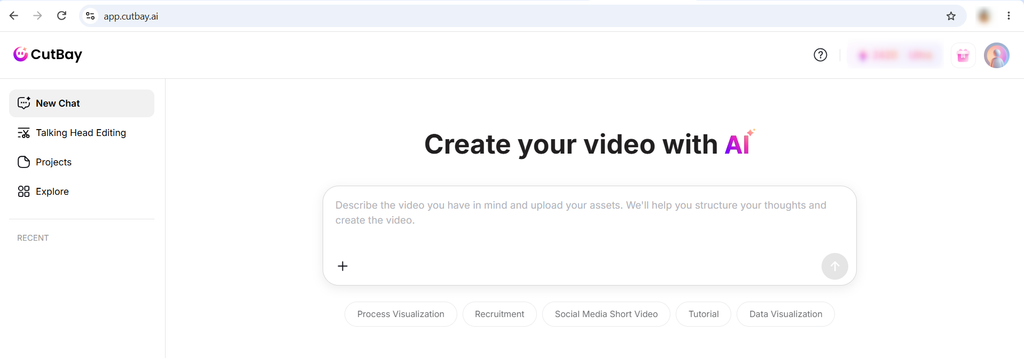
CutBay lets users communicate editing instructions through chat. Rather than manually adjusting every element, users can describe the changes they want to make to their video.
This approach may be especially helpful for beginners who find conventional editing timelines difficult to navigate. Users should still review the results to make sure the requested changes match their expectations.
3. Automated Scenes and Visual Elements
According to its official website, CutBay can help plan scenes and assemble video elements such as visuals, captions, voiceovers, music, animations, and transitions.
Automating these production steps can provide a useful starting point for promotional videos, explainers, product presentations, and social media content.
4. Templates for Different Video Styles
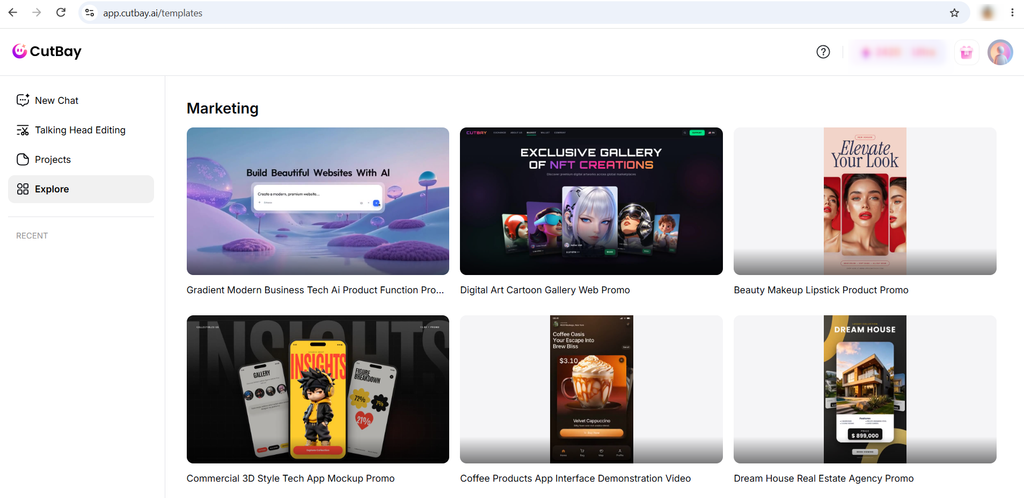
CutBay provides ready-to-use video templates that users can adapt for their projects. Templates can be helpful when someone needs a starting structure for a product promotion, marketing campaign, presentation, or other business video.
Using a template can also help maintain a consistent visual style across a series of videos, although the final result should still reflect the brand’s identity and message.
5. Refinement and Creative Control
AI automation does not mean every first draft will be ready to publish. CutBay combines automated creation with options to refine a video through chat or manual adjustments.
This balance is important because users may need to correct wording, adjust scene timing, improve visual choices, or ensure that brand elements are presented properly.
Who Can Benefit from CutBay?
CutBay may be useful for several types of users:
- Content creators: Turn ideas, scripts, and existing media into videos for digital platforms.
- Digital marketers: Develop promotional videos, campaign creatives, and educational content.
- Small businesses: Create product showcases, business introductions, and service explainers.
- Educators: Convert presentations and learning materials into visual explanations.
- E-commerce businesses: Create product videos using catalog information, images, and product links.
These use cases align with the different video creation workflows described on CutBay’s official website.
Pros and Cons of CutBay
Pros
- Supports different types of input, including documents, links, presentations, and media.
- Offers a conversational approach to video creation and editing.
- Helps automate script planning and visual arrangement.
- Provides templates for different creative needs.
- Combines AI-assisted production with further editing options.
Things to consider
- AI-generated scripts and visuals may need manual review and corrections.
- The quality of the final video can depend on the input, instructions, and selected style.
- Users should check available export options, usage limits, and pricing before committing to a plan.
- People requiring precise frame-by-frame control may still prefer a traditional video editor for certain projects.
Is CutBay Worth Trying?
CutBay offers an interesting approach to video creation by bringing content preparation, scene planning, AI-assisted editing, and conversational instructions into one workflow. Its ability to work with existing content could be particularly useful for marketers and businesses that want to repurpose blogs, presentations, and product information into videos.
However, the best way to judge whether it fits your needs is to try a real project. Start with a short blog post or product description, generate a video, and review the accuracy, visual quality, editing flexibility, and export options.
Final verdict: CutBay is worth exploring if you want a more conversational approach to AI video creation without relying entirely on traditional editing workflows. It may be especially relevant for content creators, marketers, and businesses that need to produce different types of videos regularly. As with any AI tool, review the output carefully before publishing.
Visit the official website: CutBay AI
Frequently Asked Questions
1. What is CutBay used for?
CutBay is an AI video creation and editing platform that helps users turn ideas, documents, presentations, web pages, and media assets into videos using conversational instructions.
2. Is CutBay suitable for beginners?
Its chat-based workflow is designed to make video creation more accessible to users without professional editing experience. Beginners should still review generated videos and learn the available editing controls.
3. Can CutBay turn blog posts into videos?
Yes. CutBay offers a blog-to-video workflow that can use blog content or a URL to create a video with elements such as visuals, captions, and voiceovers.
4. Can users edit AI-generated videos?
Yes. CutBay supports refining videos through natural-language chat and manual adjustments, allowing users to modify elements of the generated result.
5. Is CutBay suitable for business marketing?
It may be useful for creating product promotions, social media videos, advertisements, presentations, and educational content. Businesses should review branding, factual accuracy, and licensing before publishing.